


The Mac app for filmmakers
From card to cut.
Room for the story.
Two checked local copies.
An organised day, ready for the edit.
Be part of what comes next.
Beta waitlistBeta invitations and product updates, by email.
Small beta batches first. Wider access when it is ready.
Made for the day after the shoot
A little less admin.
A little more headspace.
- Two drives
- Read-back checks
- Resolve Studio
Mac with Apple silicon (M1 or newer), macOS 13 or newer. Tested on macOS 26.
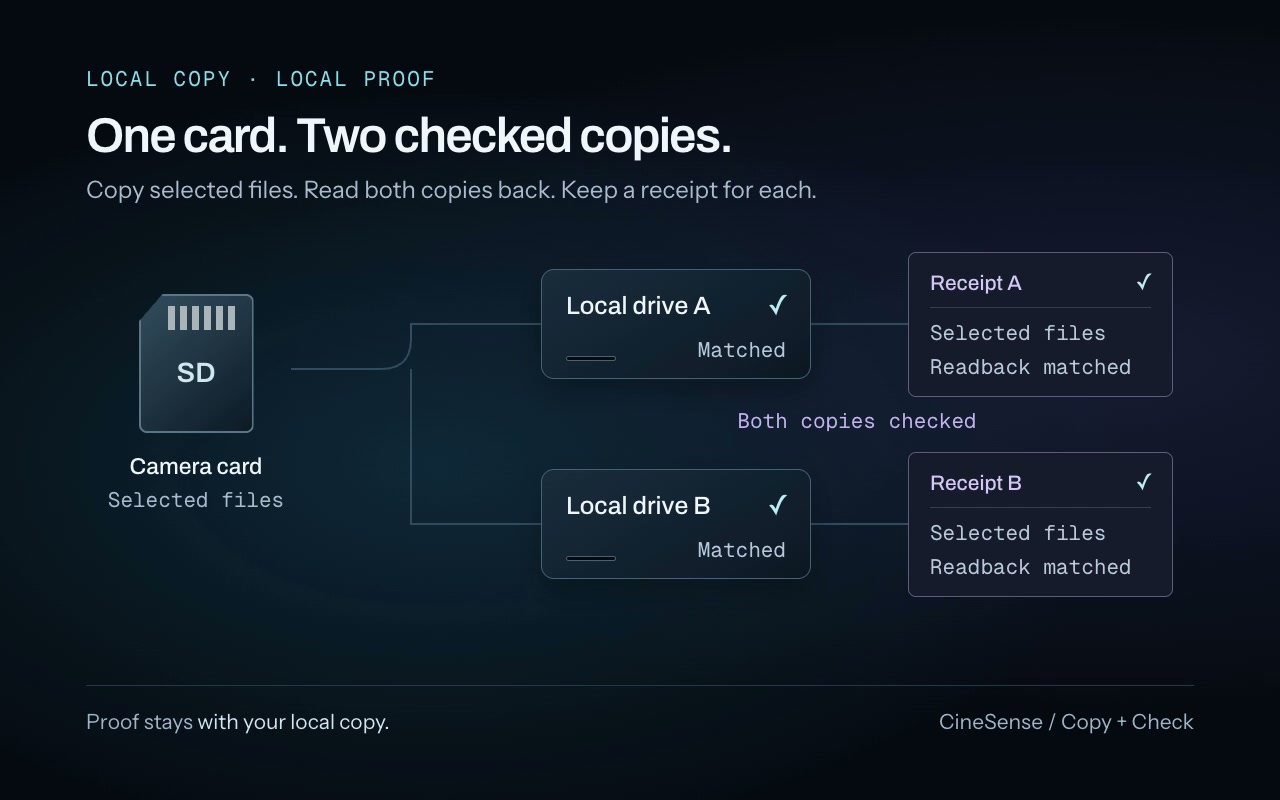
A CineSense workflow illustration: selected footage is copied from one camera card to two local drives. Each destination is read back and compared, with a receipt beside each checked copy. This illustrates local-copy proof, not a whole-card safe-to-format verdict.
A copy is a start. A checked copy is proof.
01 / Know what arrived
A copy. A check.
A record to keep.
CineSense reads each local destination back and compares the bytes. MD5 verification is supported, with ASC MHL receipts and PDF reports to keep with the day.
- 01 / Copy
- 02 / Read back
- 03 / Receipt
A checked selection is not a whole-card verdict. Safe to format considers the entire card against copies on mounted local drives. Check the footage and file count before formatting.
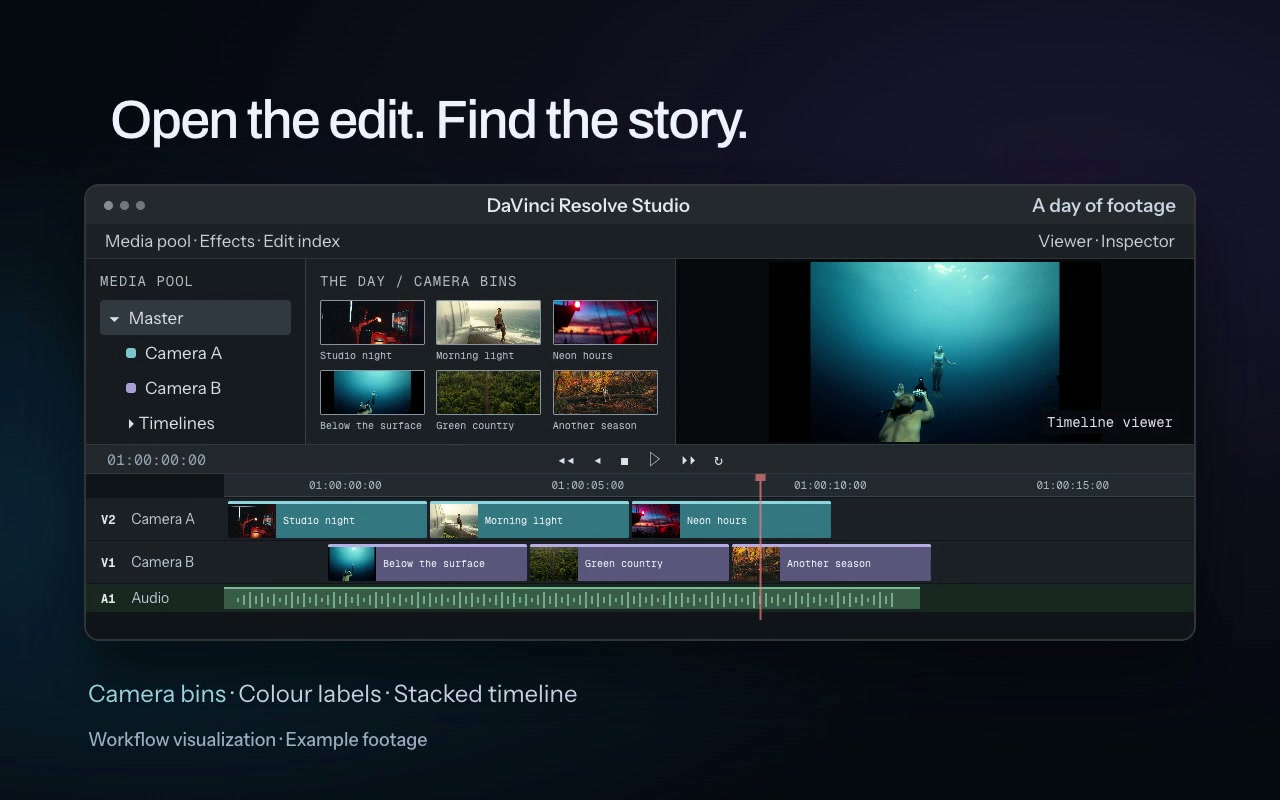
An organised shooting day becomes camera bins and a timeline in DaVinci Resolve Studio. With launch-on-send enabled, CineSense can open Resolve when it is closed.
02 / Back to the story
Keep the day together.
Start with the cut.
Choose folder patterns for your shoot. Send the organised day into matching camera bins, with optional stringouts or Stacked timelines. The footage stays in your archive.
Requires DaVinci Resolve Studio and External scripting set to Local.
03 / Optional, beyond the drives
Your accounts.
Another copy.
Upload from a checked local drive, after every ingest or when you ask. Keep your Mac and CineSense available; quitting pauses uploads and the next launch resumes.
Cloud proof varies by provider and never makes a card safe to format. Storage plans and fees are yours.
A few things to know
Before you join.
The workflow, the requirements
and what comes next.
Will it run on my Mac? Is there a Windows version?
Mac with Apple silicon (M1 or newer), macOS 13 or newer. Tested on macOS 26. There is no Windows version. Resolve handoff needs DaVinci Resolve Studio.
Can I copy to two drives? Is MD5 verification supported?
Yes. Copy to two footage drives in one pass, with MD5 verification supported. CineSense reads each local destination back and compares the bytes, then keeps ASC MHL receipts and PDF reports with the day.
Does a checked selection mean I can format the card?
No. Safe to format is a separate result for the whole card, checked against copies on mounted local drives. Older footage, extra files and camera proxies still matter. Copy is the default; borrowed cards are never cleared. Inspect footage and file count before formatting in your camera.
Can I try it now? What is the waitlist for?
Invitations are planned in small batches, with product updates along the way. Joining the waitlist does not grant immediate access. There is no promised invitation or release date.
What will CineSense cost?
Pricing and licence details will be announced before purchase. Joining the waitlist does not commit you to buying CineSense.
How does this fit alongside copying tools or my own scripts?
CineSense brings a repeatable workflow into one Mac app: chosen folder patterns, two checked local copies, receipts and a Resolve Studio handoff. Choose reusable project templates for day, scene and camera; continuous night shoots stay together across midnight.
Does the handoff work with free Resolve?
It requires DaVinci Resolve Studio and External scripting set to Local. CineSense links existing media into camera bins, with optional stringouts or Stacked timelines. Launch-on-send can open Resolve when it is closed. Your files stay in their archive folders.
Do I need cloud storage? Does uploading keep going if I quit?
Cloud is optional and uses your own storage accounts and plan. Upload after every ingest or only on request, from a checked local drive. Your Mac and CineSense must remain available. Quitting pauses uploads; the next launch resumes. Proof varies by provider and never makes a card safe to format.
A little less admin after the shoot
Make room for the edit.
Small beta batches first. Wider access when it is ready.